
YOU’RE HERE!
WELCOME TO THE
FUTURE…
We’re thrilled to have you join the NZME whānau. You’re about to gain experience at
New Zealand’s premium integrated media company. We keep millions of Kiwi’s in the
know about what matters most, shining a light on the latest and greatest in news and
entertainment. We do this by creating content, insights and sharing information across
a portfolio of radio, digital and print brands.
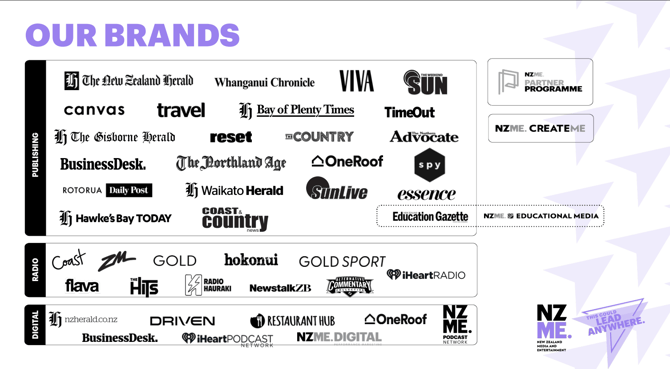
We’re home to over 50 of Aotearoa’s award-winning media brands, each with its own
voice and powered by the country’s top media personalities, journalists, broadcasters,
writers, commercial thinkers, designers, operations teams, marketers, digital and tech
specialists and many more.
At NZME you can grow your career alongside some of the best in the media world, in an
environment that fosters diversity and inclusion. You can be yourself with us!
This induction booklet will help you be informed of all the induction essentials, so make
sure you take time to read through each page.
We’re excited about where your NZME journey will lead you. The possibilities really are
endless… Give it your all and enjoy the ride
PURPOSE & VALUES
Our company purpose is Keeping Kiwi’s in the know.
• Being CONNECTED means that we understand people. We engage the right people,
share ideas and listen to our audiences and customers
• Being CURIOUS means that we ask questions, dig deeper and find gold. We challenge the
status quo, dare to try, see bridges not barriers, dig deeper to discover, and we make it
fun
• Being CONFIDENT means that we step up, speak out and give things a crack. We get to
the point, tell it like it is, do what we say, solve it at the source, and we keep it simple.
Learn more about our Values and purpose, here
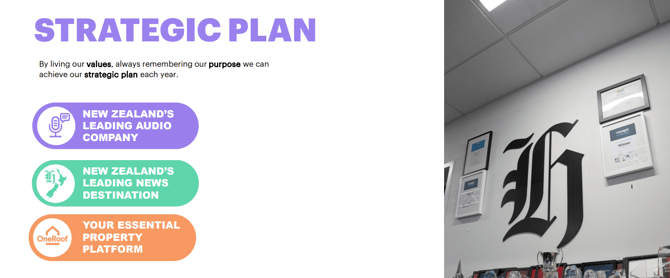
Read more on our Strategic Plan here. And to read more about NZME’s
sustainability commitment, you can read that on the NZME Corporate Website.
REWARD ME PROGRAMME
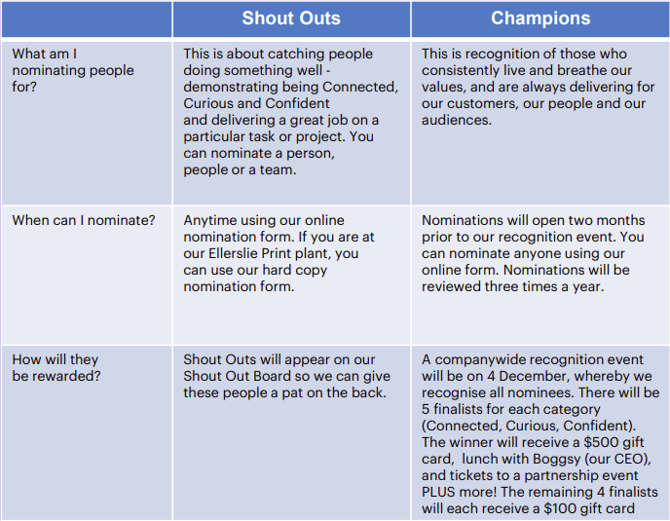
Reward Me is our reward and recognition programme. It celebrates NZME-ers who achieve great things for us and our business by living our values of Connected, Curious and Confident. Reward Me has two tiers of recognition: Shout Outs and NZME Champions
DIVERSITY & INCLUSION
We have created an Inclusion and Diversity strategy at NZME, which includes nurturing a
multicultural workforce, encouraging you to ‘bring your whole self to work’ and truly harnessing our individuality. We want to ensure everyone not only feels safe, but also that our people look forward to being here!
NZME is a proud member of Diversity Works; who work to support, advise and inspire
New Zealand organisations to be better-by-diversity. They help us utilise our diversity to create a more productive, creative and dynamic workplace that in turn impacts society and improves our ability to see and connect with the world around us.
Rainbow Tick is a certification showing that NZME has completed a Diversity & Inclusion certification process. We were the first media company in New Zealand to receive the Rainbow Tick; this is awarded to organisations that truly embrace making their workplace a safe environment for everyone, regardless of sexual orientation.
DIVERSITY COMMITTEE
Outside of the core committee you still have a valuable role to play as a wider working party as we begin to grow our understanding of diversity at NZME. We’re always open to new ways of thinking, working and highlighting diversity and inclusion at NZME.
COMMUNICATION
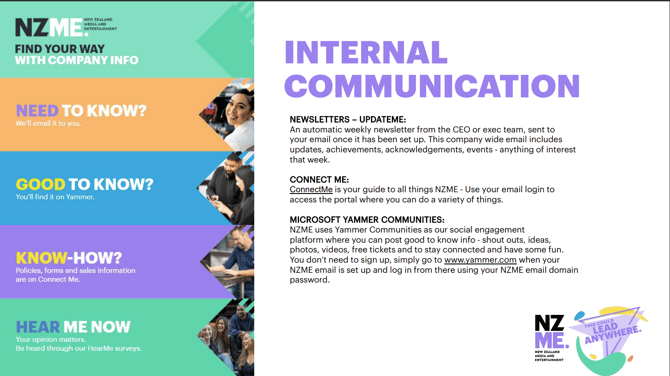
HOW WE COMMUNICATE INTERNALLY
YOUR DEVELOPMENT
GROWING YOUR CAREER AT NZME.
When you're in charge of your own career, it is important to get feedback from others, so you have a realistic picture of your skills, capabilities and development areas.
You and your manager should have weekly or fortnightly “WIPs” (work in progress) meetings to talk about your role, your performance and your development. Feel free to bring up any areas of concern/challenges you’re facing and have open discussions about your development.
While you also have the opportunity to formally discuss your performance and development twice a year through the Guide Me performance review process, performance discussions should be an ongoing thing. You should also ask your colleagues, clients and others for feedback as they will all have a different perspective.
Speak to your manager or the Culture & Performance team if you have questions about your
development at NZME.
Tip! Lynda.com is a great way to access thousands of free LinkedIn Learning training resources for self-development. You simply just need to register online for a library e-membership and you’ll be able to log in to access the content. Check on Google here if your local area has a library where you can register for a card number.
For Auckland based people, you can register with Auckland Libraries here; you’ll get an email to your registered email address and you can access LinkedIn Learning here.
YOUR FIRST
DAY
• GETTING SET UP!
Access Cards for NZME Central – Provided to you for access:
• Through doors on each floor (doors by restrooms/elevators)
• To select a floor in the elevator
• The main building doors after business hours
• Using the printers
Access cards for other sites – Please check with your office manager, team lead or administrator for instructions.
Computer logins – Will give you access to any NZME computer, and Connect Me.
Personal NZME email logins – Your manager will be providing your details.
Email Signature Generator - set up your customized email signature!
Access to Shared Inboxes – or additional Product Logins (If needed), speak to your manager.
Printer Setup
• Speak to your office manager, team lead or administrator about the printer settings for your site.
Employee Benefits – Check out the discounts you’ll have on products and services. And make sure you set up your free access to NZ Herald Premium and VIVA Premium online.
NZME Mobile Phone – Need a work mobile? Read our policy via the link.
Key contact emails:
• security@nzme.co.nz (NZME Central only)
• reception@nzme.co.nz (NZME Central only)
• newsdesk@nzherald.co.nz (For sending news tips to the NZME newsroom!)
• Service.desk@nzme.co.nz (IT queries)
• payoffice@nzme.co.nz (Payroll queries)
• facilities@nzme.co.nz (Facilities or office building queries)
MICROSOFT OFFICE 365

All NZME employees are supplied with an account in Office 365; a cloud-based hub for
emails, document storage and other business collaboration tools.
If you get stuck a guide has been provided within your 365 account or find a link
on ConnectMe here.
Join the Yammer group for tips and tricks along the way here.
AFFINITY
(YOUR PAY & LEAVE)
Affinity is the name of NZME’s payroll system. You may have received an email to your
personal email address to set up your account, add your bank details and Kiwisaver
forms prior to your start date.
Your Affinity account needs to be set up using your nzme email address.
PAY CYCLES
At NZME most employees are paid fortnightly.
PAYSLIPS
You can access your payslips through Affinity, click here and use your computer login click
MY PAY. Click All Pay slips, select the period you’re looking for and click download.
Need more information about your pay? Check out our handy page on Connect Me here.
APPLYING FOR LEAVE
You can apply for leave through the affinity self-service portal. Click here then under the
LEAVE tab you can apply for leave, calculate future leave or check your leave history.
This leave application goes through to your manager for approval – if it is approved you will
receive an email notification.
Your leave entitlements are outlined in your employee agreement.
Want more information about leave and entitlement? Go to this page on Connect Me that
takes you through to Employment New Zealand Guides.
MEETING ROOMS
Book a Room
• Login to your NZME email in Outlook
• Select ‘New’ – ‘Calendar Event’
• Beside ‘People’ select the ‘Scheduling Assistant’
• After clicking ‘Add room’ select the room list for your location
• Please note some rooms may be restricted for booking for specific teams
Connect to a Screen
• Select the green icon on your desktop called ‘WIPS’
• The receiver device number will be displayed on the screen
• Type in the passcode and your screen will be mirrored
• If joining from a Zoom-enabled room, you can connect and share your screen through the Zoom app on your computer. Open the Zoom app and click ‘Share Screen’.
Alternatives
• If you’re in NZME Central and there are no events are on, the iHeart lounge can be a good place to meet over a coffee
• There are several pods and meeting tables scattered around the kitchens on each floor
Not sure where to find a meeting room? Check out our handy guide on Connect Me here.
HEALTH & SAFETY
YOUR PERSONAL HEALTH, SAFETY AND WELL-BEING WILL ALWAYS BE PUT FIRST AT NZME.
Your personal health, safety and wellbeing will always be put first at NZME and we have a range of processes in place to make sure you leave at the end of each working day the same way you came in (hopefully even a little better). The following information is a quick
snapshot of how we can work together to ensure our own and others safety and wellbeing.
NZME has a range of policies that outline how we can work together to maintain a healthy, safe and awesome environment. For more information head to our Safety page on ConnectMe.
On top of your Manager, NZME has a dedicated Health, Safety & Compliance Manager who you can contact if you're in need of specific health and safety support or advice:
Frana Potter
Email: frana.potter@nzme.co.nz
Mobile: 027 255 1989
IMPORTANT MEDICAL INFORMATION
FIRST AIDERS:
Every site has in place fully stocked first aid kits and trained first aiders who can offer basic medical assistance when required. Look out for our first aider signs located on people’s desks that will help you identify who is trained in your office.
The location of first aid kits are identified by our first aid kit signs. If you’d like further assistance, either speak with your Manager or send an email request to: frana.potter@nzme.co.nz
MEDICAL CONDITIONS:
If you have a medical condition that could require medical assistance at work, we highly recommend that you inform your local first aider or the Health, Safety and Compliance Manager. Your medical information will remain completely confidential however we’ll be prepared should you require medical assistance on site.
DEFIBRILLATORS:
Auckland Central
There is a defibrillator located on the Ground Floor in the iHeart bar. Please contact Reception or Security for assistance.
Ellerslie
There are two defibrillators located within Ellerslie. One is located within the Ellerslie Press Hall first aid room and next to the TV Information Screen/ Noticeboard.
Regional Offices
The majority of our regional offices don’t have defibrillators onsite however please check with your Manager. You can head here to locate your closest defibrillator and always call 111 in an emergency.
MENTAL HEALTH & WELLBEING
It’s important that you put your health and wellbeing first. We are dedicated to supporting not only your physical but also your mental wellbeing.
NZME staff have access to TELUS Health (Formerly Benestar), a website that offers
informative articles, self-assessments, coaching programs, interactive learning modules, meditation, stress release and more.
Head to Telus Website and enter:
ID: NZME
Token: n51eap
Then use your work email to register and create your own TELUS Health account.
Head to this page on Connect Me for in depth details on how to access the TELUS Health Hub.
If you’re going through a hard time and need support, our Health, Safety and Compliance Manager is here to work with you and develop a plan to help you get back on your feet without the fear of this impacting your role.
NZME employees have access to three free local counselling sessions which are all
completely confidential. Best of all you don’t need prior approval to access these, just
contact our independent employee assistance provider Telus directly. Contact Telus on 0800
360 364 or head to their website here.
Wellness/First Aid/Breast Feeding Room
Ask your Manager about the location of your sites wellness, first aid or breast-feeding room, alternatively email frana.potter@nzme.co.nz. More information is on our Wellness page here.
COMMUNICATION IS KEY
The way NZME continues to grow and fine tune is through sharing our experiences and events and learning from them. The same rings true for health, safety and security. If you are involved in or witness an event that is a risk to someone’s health, safety or security it’s important that you notify your Manager and the Health and Safety team as soon as possible.
The easiest way to do this is through the use of SafeguardMe, NZME’s online health and safety reporting system. Just head to http://safeguardme.nzme.co.nz.
Once you’ve submitted a SafeguardMe form, it automatically notifies your Manager and the Safety Team with the details of the event you’ve reported. Someone will be in touch with you to find out more about the event and how NZME can help.
If you don’t have access to a computer, ask your Manager to show you where our paper-based forms are kept which once completed can be handed to your Manager or emailed through
to: frana.potter@nzme.co.nz
Logging into SafeguardMe is really easy:
Username: first.lastname@nzme.co.nz
Password: Your current network password
SUFFERING AN INJURY AT WORK
If you suffer an injury or illness at work, please notify your Manager and our Safety team immediately through either direct contact or by reporting it through Safeguard Me. This
ensures you’re provided with immediate treatment and care and allows NZME to take action to reduce the risk of anyone else becoming injured or ill.
If you’ve seen a Doctor in relation to your injury or illness, please forward any copies of medical certificates to your Manager on the same day it has been issued. Your Manager will work with you to:
• Consult with you, your medical provider and ACC to manage
your recovery and return to work plan;
• Provide workplace rehabilitation where safe and appropriate
to do so;
• Ensure payroll is notified of any disturbances to your normal
hours worked so that you’re paid correctly
Requiring Time Off Work Due To An Injury
If you need time off work due to an ACC work or non-work related injury, our Payroll team will need to be informed beforehand so that they can work with ACC and ensure you’re paid correctly.
The best way to do this is to login to our payroll system Affinity and select either ACC work or ACC non-work leave: www.affinitylogon.com
If you’re unsure how to access Affinity, contact your Manager or email Payroll at payoffice@nzme.co.nz.
If you require more than 5 working days off, ACC will compensate you up to 80% of your wage. You can have this amount topped up to 100% through the use of available annual or sick leave, which your Manager can organize for you.
SECURITY
YOUR PERSONAL SECURITY:
Unfortunately, in today’s society people working in the public eye face increasing cases
of harassment, stalking, threats of personal harm, retaliation and extortion. One driver is
the easy access to information about an individual that can be obtained over the internet
and the increasing access people give to the public through their own social media
pages.
It is extremely important that you report any cases of threats, abuse, harassment or
intimidation no matter how minor, to your Manager and the Health, Safety
and Compliance Manager. We will ensure your security isn’t put at risk and
take appropriate steps to manage any situation. This includes threats or
harassment from people or family members that may be known to you. While we
understand the important role social media plays, the safety and security of our people
will always be a priority therefore we suggest the following steps to help you
mitigate the risks to your personal security.
ONSITE SECURITY:
We have Security on site at our Graham St offices and panic buttons located in our
Auckland studios. If you are based in one of our regional offices, always contact 111 in
an emergency. Never allow anyone that isn’t familiar to you access to secure locations
within your site. You could be putting your own or someone else’s safety at risk. If you
are issued with an access card and loose it, please report this to Facilities immediately
by emailing: facilities@nzme.co.nz
IMPORTANT EMERGENCY INFORMATION
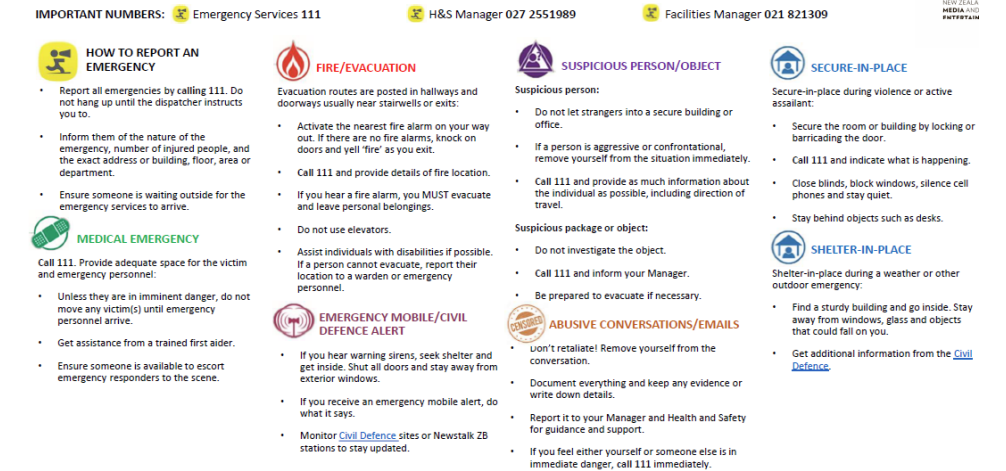
RISKS YOU NEED TO BE AWARE OF
Fatigue
It might be the new hours you’re working, additional hours spent on a project or event, difficulty sleeping at home or burning the candle at both ends. Whatever it is, if you’re feeling constantly run down or fatigued let your Manager and the Health, Safety and Compliance Manager know so we can assess your situation and produce a plan to ensure you’re obtaining adequate rest between work. Never operate a vehicle, machinery or undertake high risk activities when you’re feeling fatigued!
Noise Exposure
Each individual responds differently to noise, therefore the exact level at which noise can cause damage isn’t certain however NZME has an acceptable noise exposure standard of 85kB(A) averaged over an eight-hour period. A sudden noise level in excess of 140 dB(A) is considered extremely hazardous and capable of causing immediate hearing damage. If your role requires you to be exposed to high noise levels e.g. people frequently in studios, present at live music events or working within our Print plant, you must be provided with and wear appropriate hearing protection to avoid the risk of hearing loss.
Manual Handling/Lifting
Most roles at NZME will require a degree of manual handling of equipment, therefore if you have an injury or illness that makes you more prone to injury it’s important you tell us so we can take steps to ensure you’re not put at risk. Never attempt to lift something that you can’t handle safely - always ask for assistance or utilize any lifting devices made available to you. If you’ve been asked to erect equipment that is new to you, make sure someone experienced shows you what to do prior to attempting it yourself.
Workstations
Sitting is the new smoking and can cause lasting damage to your body, therefore it’s important that you have your workstation setup correctly. Please speak with your Manager about having your new workstation assessed by an Occupational Nurse or contact frana.potter@nzme.co.nz for support.
Driving
In your role you may be required to operate a vehicle that is unfamiliar to you. Before you operate a vehicle for the first time please ask someone to give you a quick rundown of the car you’ll be driving. Only agree to operate a vehicle if you feel comfortable doing so especially if you are required to tow something. Never operate a vehicle if you’re feeling fatigued, are under the influence of alcohol or drugs, or don’t hold a valid
full NZ drivers license. It’s important you familiarise yourself with our Motor Vehicle Policy and the details about the booking app, DRIVEME.
Alcohol and Illegal Substances
There may be occasions where you are asked to attend work-related functions or events where alcohol will be served. NZME is committed to ensuring that in these situations you have access to low or non-alcoholic beverage options and food. During these events, NZME
requires you to exercise moderation and behave appropriately. Please refer to NZME’s Drug and Alcohol Policy and Acceptable Workplace
Behavior Policy on ConnectMe for more details.
Bullying and Harassment
NZME is serious about providing a workplace that is free from all forms of bullying and harassment. This is whether the bullying or harassment is coming from someone within the workplace, a member of the public or a customer. For more information, please refer to NZME’s Bullying and Harassment Policies on ConnectMe.
Promotional and Brand Engagement
If you are joining our Promotional or Brand Engagement team, it’s important you watch these short (and entertaining) safety videos created by our
team:
NZME's guide to promo vehicles
NZME's guide to using the T-Shirt cannon
NZME's guide to Uniforms
Collecting promotional gear from Ellerslie Print
ELLERSLIE PRINT PLANT
Our Ellerslie Print Plant is deemed a high-risk site where people are required to undertake safety sensitive activities.
If you will be working within Ellerslie Print, working within the Ellerslie site or visiting the site, it’s important that you are aware of the following information.
CLICK HERE IF YOU WILL BE WORKING AT OUR NZME ELLERSLIE OFFICE TO READ ABOUT OUR SAFETY PROCEDURES.
THAT'S A WRAP!
As you explore your new office and position at NZME, take a moment to introduce yourself to some friendly faces so we can get to know you better!
Below are a few wrap up items, and the last page is blank for notes or questions as you get settled in. Once again welcome to the NZME family, and don’t forget to stay Curious, Confident, and Connected!
HEALTH & SAFETY QUIZ:
Once you have thoroughly read through the Health & Safety section of this manual then please complete the Health & Safety Quiz that you’ll find later in the induction hub.
KEY POLICY REVIEW:
Our success at NZME is a reflection of each of us being CONNECTED, CURIOUS and CONFIDENT.
Our policies exist to help us achieve this goal. In order to engage the right people, take ownership and solve it at the source, we have policies, standards, systems and processes to enable us to work in a consistent way to deliver our best each day. Please complete the Key Policy Review that you’ll find following the Health & Safety Quiz in this hub. You might need a cup of tea to get through this
one go!
• More Onboarding Info: Get on board
• Our Structure: Our Structure
• Corporate Site: www.nzme.co.nz/
• Technology Help: Technology
• Additional Sales Info: Commercial
FOR INDUCTION QUERIES contact the Culture & Performance team at psupport@nzme.co.nz