Digital 101
System:
- Digital Specialist to plan digital schedule
- Media Manager to book
- Digital Dashboard for missing’s
- Email to send specs/deadlines
- Email Dan Redman for Rich Media
- ATOL for creating ads in-house
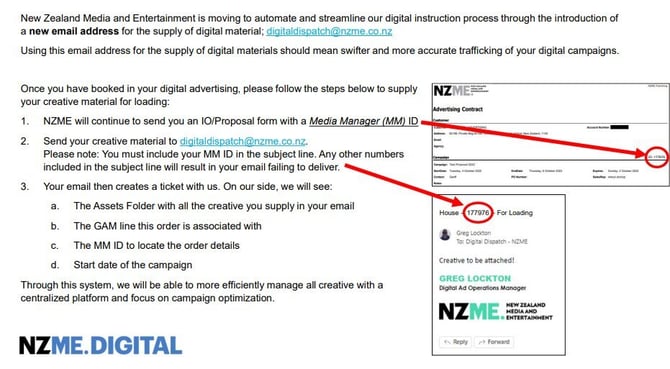
- Digital Dispatch for loading creative
- Digital Dashboard to check performance
The process for digital is:
- Brief is taken from client
- Information is put into BriefMe
- Digital Specialist reviews information, and plans schedule
- Client approves
- The AM/MC will send a booking request to Media Manager who book in the campaign and theAM/MC will get a confirmation from MM
- Media Coordinator/AM sends specs/deadlines and chases client for creative
- If Rich Media (Big Reveal / Portal / Showcase) is booked, send information to Dan Redman forhim to create assets. (Aim for at least a week before campaign start date).
- We can create ads in–house via ATOL if need be
- Once material is approved/received, we send the material to Digital Dispatch, with a URL andinstructions, who load the creative and send us previews/screenshots to send to the client.
- The MCs check the digital missing’s in GAM daily and contact clients to find out what they wantto do for the creative – we do this at least a week out from start date.
- The MCs also check how a digital campaign is performing; we do this at least once per week.When a campaign is under performing, we alert the digital traffic team who then ensures itperforms in full.
Digital IOs/Products
Digital campaigns can have multiple products/target audience booked together
- Take note of placement: NZH/OneRoof/NZME
- Is it mobile/desktop or ROS?
- What product is booked? Does the creative need to go to Dan Redman?
- Does everything start on the same date? Is it split across months? \

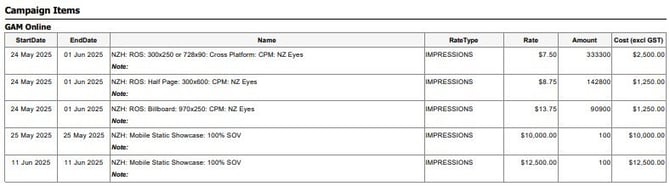

Digital Booking
Email Media Manager to book a digital campaign - svc.cdmmmanager@nzme.co.nz
Email booking form through to the Media Manager team or send an email with the below information;
Client name:
Account Manager name:
Campaign name:
Start date:
End date:
Product:
Impressions or clicks:
CPM or CPC:
Cost:
Coordinator and Account Manager will receive the booking confirmation - IO
Rich Media Creative
Dan Redman builds the following for us: Rich Media Creative: Creative that needs to be built in 3rd partycreative platforms (bonzai etc)
- Desktop Skin
- Big Reveal
- Multi reveal
- New view video
- Video Pillar
- ‘The Cube”
- Video Banners
- Dynamic showcase
- Fillboard
- Portal
and any of the standard display units if they require bespoke interactivity.
Dan requires 3-5 days to build these, do deadlines are extremely important here.
Note that there is a minimum spend of $5,000.
Briefing in creative to ATOL
- If the client is not suppling ready-made creative and would like NZME to create the ad:
- The client will need to supply a brief that includes imagery, wording and URL depending on what Digitalplatform has been booked.
- To create the ad through ATOL you will need to search the client in Media Manager and find the booking.
- Click on the drop down next to Converted and click on View.
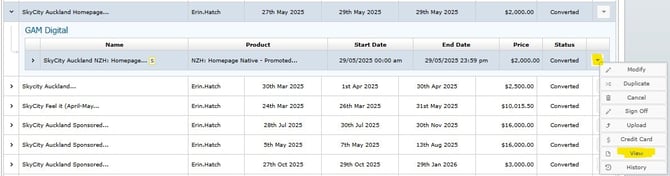
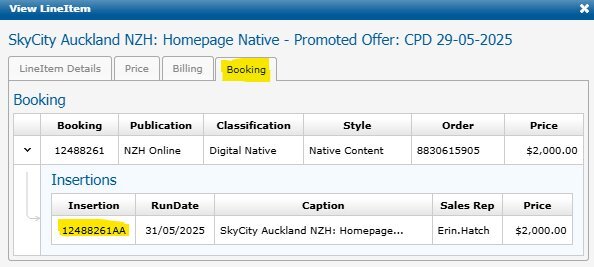
- Once in View go to Booking and copy the insertion Number
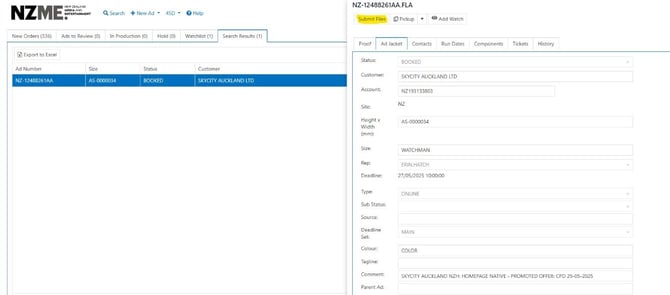
- You will then need to fill out all the questions with the information that the client provides you.
- Once you have submitted all the information click Add to Watch List and someone from the Ad SupportTeam will begin creating your ad.
- Once you have received a proof you then will need to check everything is correct and send that proof on tothe client.
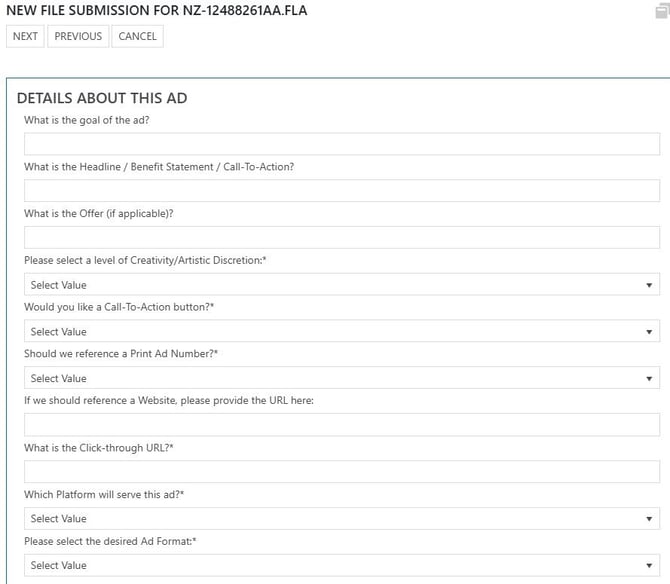
- Take that Insertion Number and Insert that into ATOL where the Ad Number goes:
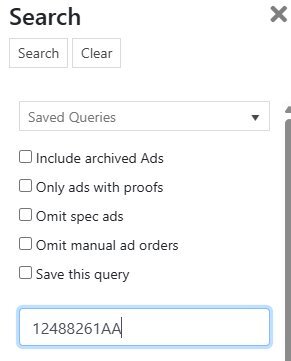
-
Once you come to the briefing page you will submit your files that the client hassent through to you:
Checking missing’s
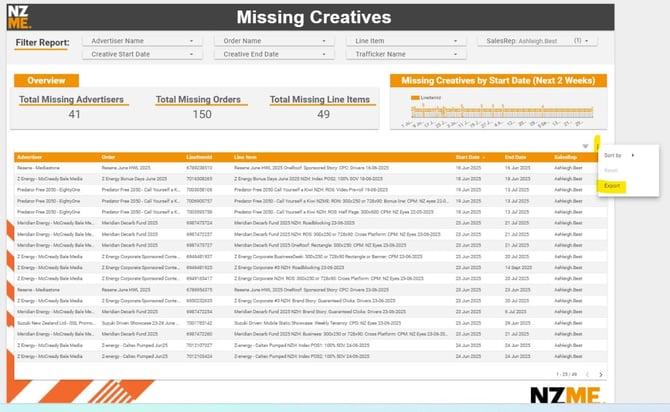
Go to the Digital Dashboard and open the Missing Creatives tab
Filter by Sales Rep
Export to Excel if you need;
Click the three dots at top right of table
- Export: CSV (Excel)
- It will export in Excel and you can make notes
Sending Specs and Deadlines
Email client with specs and deadlines;
You can send an email with details included or attach a spreadsheet with all details, include links directly from our trade website;
Please see below specs and deadlines for this campaign;
-Native Performance; https://www.nzme.co.nz/advertise/rates-specifications-deadlines/cross-platform/native-performance
-The Showstopper: https://www.nzme.co.nz/advertise/rates-specifications-deadlines/cross-platform/the-showstopper
We require assets to be supplied 3 - 5 working days prior to go-live for loading and testing
Ensure you supply a click through URL/UTM/or tags with your creative
Chasing creative
f client has not provided creative by deadline, follow up by email, reminding them deadline is today.
Hi ….
A reminder your digital creative is due for the attached booking.
-Native Performance; https://www.nzme.co.nz/advertise/rates-specifications-deadlines/cross-platform/native-performance
-The Showstopper: https://www.nzme.co.nz/advertise/rates-specifications-deadlines/cross-platform/the-showstopper
We require assets to be supplied 3 - 5 working days prior to go-live for loading and testing
Ensure you supply a click through URL/UTM/or tags with your creative.
Sending Creative to Digital Dispatch
Checking performance
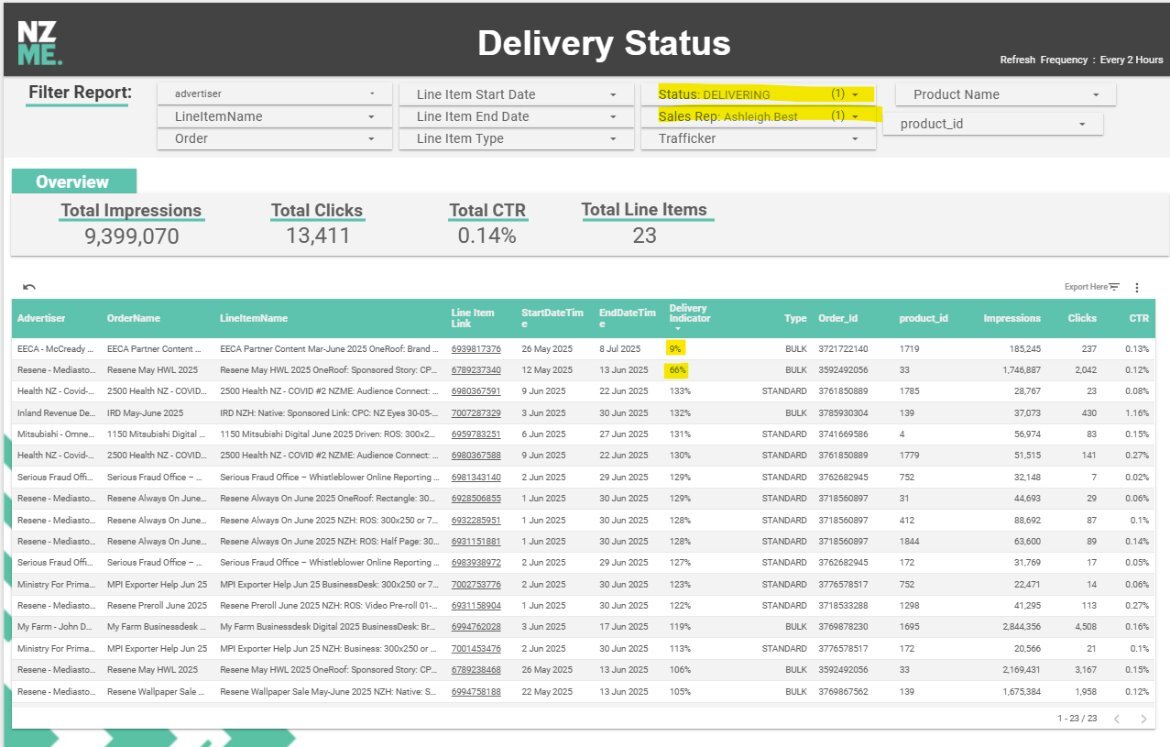
Go to the Digital Dashboard and open the Delivery Status tab
Filter by Status DELIVERING and Sales Rep
If it is a daily buy, ignore, there is no goal
Email Traffic if all of the below apply;
- Is the line under 80%?
- Has it been running for more than2 days?
- Is the campaign ending in the next 3 days?
- In the example on this page, Iwould email about the Reseneline. Ends tomorrow, only at 66%