
STEP 1 – CHECK AVAILS - LINK
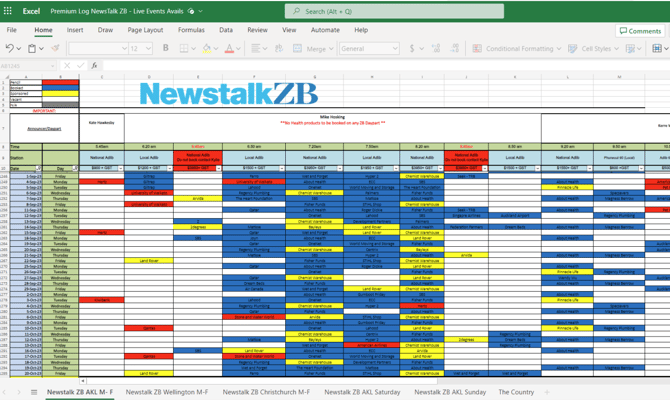
STEP 2 – EMAIL LIVE EVENTS & ADLIBS
Email Adlib_Bookings@nzme.co.nz using the below template to notify of dates and times wanted to book.
This will then be pencilled into the Prem Log.
Note: this notification is not a confirmed booking.
TEMPLATE:
Client Name:
Dates:
Network/Local:
Host name:
Client Brief: (This will be used for host approval. Ensure that as much detail is included in brief, so the host has a good overview of the client and what they want to deliver).
• Live Events Co-ordinator will obtain host approval and pencil bookings into prem log.
• Email confirmation will be sent to Media Specialist and Media Co-ordinator.
• Media Specialist and or Media Co-ordinator to send email confirmation when completed booking has been made in Drive.
Live Events Co-ordinator to update booking in prem log to confirmed and notify when completed. Live Events Coordinator to
update Live Events calendar when confirmed.
Challenging:
• In the event that a Media Specialist wishes to challenge a time already pencilled in, a challenge will be in place for 24 hours.
Live Events Co-ordinator will email the challenge out and when the 24 hours is up if the original pencilled booking is not
confirmed then the booking will be given to the Account Manager who challenged the booking.
• Pencil bookings will only be held for 7 business days.
STEP 3 – BOOK IN DRIVE
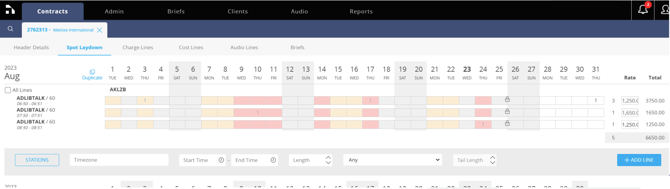
Book into Drive, on an Adlib only contract:
Header: include ‘ ZB Adlibs’in the description
Spot laydown:
• Select correct Station/Region
• Enter ADLIBTALK for 60sec adlib or PHONEOUT for 90sec
• Enter exact time of adlib – e.g. Start: 7:20am. End: 7:21am
• Cost (must be ratecard, unless prior approval obtained)
Go Live and advise Adlibs Bookings via email that booking is complete with contract number.
STEP 4 – BRIEF SCRIPT
Script deadline is 12pm day prior to air date.
If client sends script well written with correct word count, you don’t have to brief into Drive.
Refer to Adlib Toolbox
(2. Radio Products > 11. Adlib Forms and Process for word count guide)
Process for Drive ADLIBTALK and PHONEOUT Brief
• Ask client for copy pointers or draft script
• Once this is received, put a brief through Drive via the contract
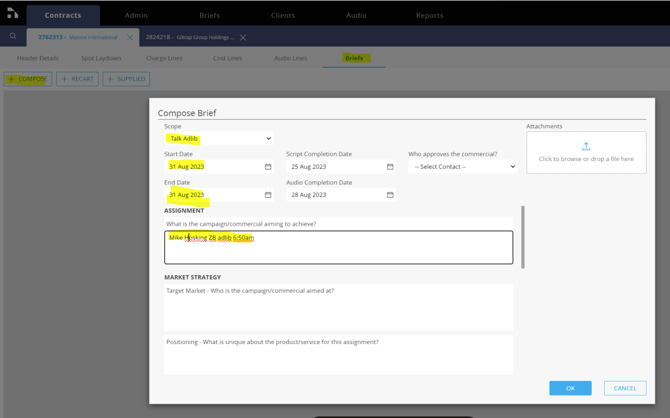
BRIEF
• Select Talk adlib or Talk phoneout from drop down options
• Enter dates: IT IS REALLY IMPORTANT YOU CHANGE THE DATES TO THE ACTUAL ADLIB DATES
• Add the Host and time of adlib in the first field
• Be as clear as possible, give as much information as you can
• Once Writer has sent script for approval, get client approval (if changes required, put back through Drive)
• Approve script via Drive portal email
STEP 5 – SEND SCRIPT
Ensure the following is adhered to for all scripts. This is to ensure that the script is read out correctly.
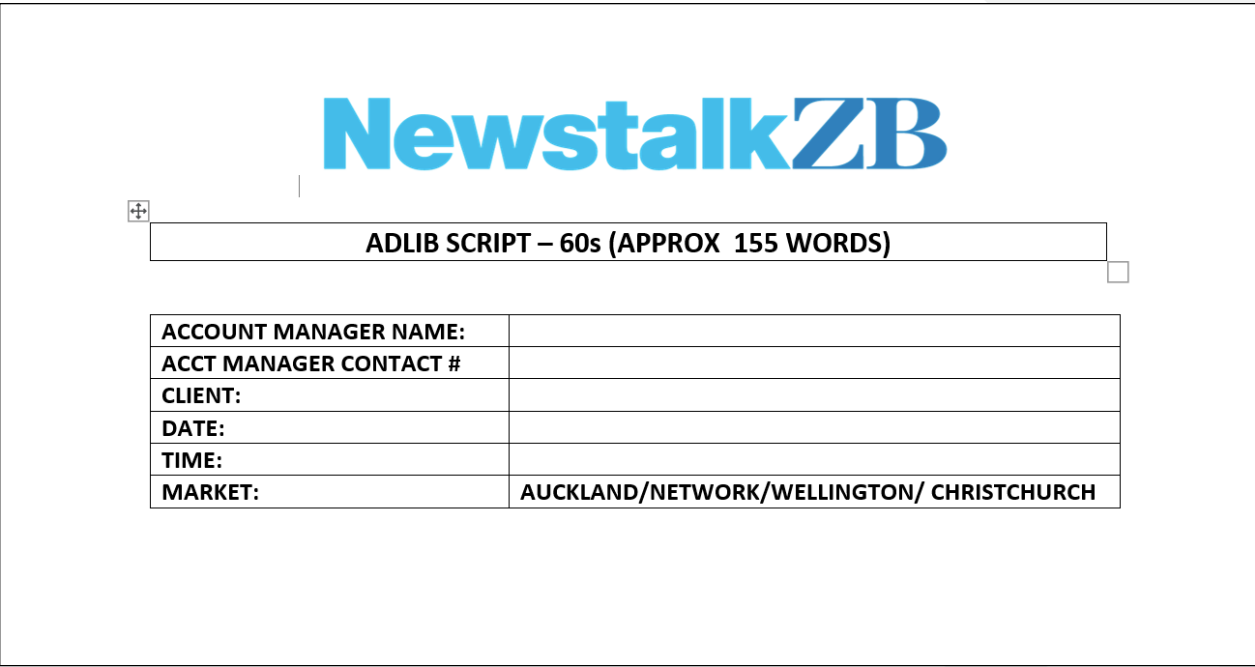
• Put script on the correct Word template with all details complete. Templates are located in the commercial toolbox:Adlib Toolbox
• Check word count from 'word count doc.'
• Email all completed scripts attached on Word template to Adlib_Bookings@nzme.co.nz
• CC in your Media Coordinator. Do not contact the announcers and producers with these scripts
Note:
• All numbers e.g. 1 are typed in full e.g. one (this includes phone numbers 0800 333 222 should be written as oh eight
hundred triple three triple two)
• Website url’s should be typed in full e.g. www.jesters.co.nz should be typed as www dot jesters dot co dot nz or jesters dot
co dot nz will be accepted
• All dollar figures e.g. $100 should be typed in full e.g. one hundred dollars
• A host will not endorse any product therefore no 'I haves' or 'I own' are to be in script
STEP 6 – RAP Chch & Wgtn
If you are booking into the below markets/times these spot will require a header per booking as each spot will have a new piece of audio recorded.
All spots booked (less the Wellington local and Christchurch locals mentioned below) will be
instructed with a silence and do NOT require a RAP.
Wellington Local
Monday – Friday – 6:20am
Monday to Friday – 6:50am
Monday to Friday – 7:50am
Christchurch Local
Monday – Friday – 6:20am
Monday to Friday – 6:50am
Monday to Friday – 7:50am
Monday to Friday – 1:50pm
Any urgent, business critical, same day revisions MUST be emailed to Adlib_Bookings@nzme.co.nz or call Kylie Gray on 027 224 9608.
NOTES
• Ensure you adhere to the deadlines, the deadlines are in place to ensure your clients audio gets to air on the dates that are booked.
• If the deadlines are not met, then your spot will be deleted from the spotfall and you will need to rebook – talk to PJ.
• Ensure all scripts have the correct air dates
• All queries are to be emailed to Adlib_Bookings@nzme.co.nz